Pages

Sunday, December 28, 2014

Piktochart : Infographics


Make information beautiful. Create, share and dazzle with beautiful infographics. Simple and intuitive, it is built for the non-designer.

Infographics without the learning curve

Simplicity is key. Create informative and engaging infographics in 3 easy steps. To insert an element, find it on the menu, drag it, drop it on your canvas, and voilà! The tools are familiar and the actions are intuitive. You’ll be done quicker than you can say infographics!


In this video you can learn how to create infographics, from logging in, editing text/fonts, creating charts, special quick tips, editing layout that would really help you get the most of Piktochart, the infographic editor for non-designers. Source: www.Piktochart.com

Sunday, October 5, 2014

Wevideo


WeVideo lets you create great videos in a flash. Drag and drop your videos, trim and choose from our pre-made themes to set a unique style. Go advanced when you are ready.


Use WeVideo on all devices - mobile, tablets, laptops, Chromebooks & desktop computers. Students can create from computers both at school and at home ... as well as on their smartphone from anywhere.


Thursday, May 22, 2014

Easelly:: Create and share visual ideas


What is Easel.ly?
Easel.ly is a website that features thousands of free infographic templates and design objects which users can customize to create and share their visual ideas online. Using the site is as easy as dragging and dropping design elements, and users can either choose a template from our extensive library, or they can upload their own background image and start from scratch. Over 300,000 users have already registered with Easel.ly, and thousands of infographics are produced using the site every month.

You have here an example from our Faculty news blog 


source: Easelly

Monday, November 11, 2013

Slides:: online editor

Slides is a place for creating, presenting and sharing presentations.
Create The Slides editor is available online, right in your browser. Unlike traditional presentation software, like PowerPoint, there's no need to download anything. All of your work is stored securely on our servers, accessible wherever you are. Present Whether you speak at a conference, host a meeting, or just send your deck out by email, your story is conveyed in the beauty in which it was crafted. You can also export a PDF and share or print it for your audience. Share Decks are freely viewable anywhere on desktop, tablet, and iPhone and Android devices. All you need is an Internet connection and a web browser. Source: https://slid.es/ Thanks,

Tuesday, October 15, 2013

Creaza: I'm a great storyteller

Improved learning:

- Creativity
- Storytelling
- Critical thinking
- Communication

Creaza is the perfect toolbox for enabling students to develop their 21st Century Skills. With powerful tools and an extensive, built-in media library, Creaza combines reading, writing and multimedia with critical thinking, communication, collaboration and creativity.

Creaza is currently available in nine different languages, and Language Arts is also the subject in which Creaza is most widely used. Many teachers tell us about students improving their reading and writing, as well as bettering their text comprehension and text creation, as a direct result of using Creaza. The motivation to create complex texts, and to discuss and present them, is greatly enhanced.

Creaza is the perfect tool for helping students to develop their digital literacy.


How it works.


Vcasmo: a multimedia presentation

VCASMO is a multimedia presentation solution for photo and video slide shows, business presentations, training, academic teaching, sales pitches, and seminars.
Use VCASMO to create video and slide presentations simply and support playback for a computer browser, mobile browser and iPad. Upload a variety of video formats, including PowerPoint, PDF, Image, MP3, and Adobe Flash. Select different presentation layouts or use your own design. Add captions or subtitles to presentations. Download presentations offline, or export presentations as videos and auto-upload to YouTube.


How it works


Monday, April 29, 2013

Mural.ly


Mural.ly is a easy way for creative teams to think, imagine and discuss their ideas. You can aggregate media and files, ideal for group ideation and visual sharing. It lets visual people creatives quickly map that content, share their ideas and receive feedback or new ideas online. Murals can be co-created real time within teams, like Google Docs. Whach the video:

Saturday, February 16, 2013

Photovisi- Collages


 Photovisi is a online photo collage. It's Free and you don't need to download any software. 
You can also save to compute or send to friend via email. Photovisi also offer a variety of templates and options to crp, delete or rotate images.

It is a great tool for your students.

Monday, February 11, 2013

Teacher Tube


Is a video sharing website similar to, and based on, YouTube. It is designed to allow those in the educational industry, particularly teachers, to share educational resources such as video, audio, documents, photos, groups and blogs. The site contains a mixture of classroom teaching resources and others designed to aid teacher training. A number of students have also uploaded videos that they have made as part of K-12 and college courses. As of July 2008, the website contained over 26,000 videos and now as of October 2010, TeacherTube has over One Million+ educational members and over 400,000 educational videos. It has found favor with educators for whom YouTube content is blocked by content filtering systems (information from wikipedia)

Monday, September 17, 2012

Tagxedo - word Clouds


Tagxedo turns words -- famous speeches, news articles, slogans and themes, even your love letters -- into a visually stunning word cloud, words individually sized appropriately to highlight the frequencies of occurrence within the body of text.

Woices


Listen, create and share FREE geolocalized audioguides. 
Share your voice and make the world a more interesting place. 

Woices is for iphone, android and BB


Example with woices:


Tuesday, August 28, 2012

ANIMOTO


Animoto helps you create extraordinary videos from your photos, video clips, words and music. 
with Animoto you can choose your images, music and video clips from Facebbok, Flickr, Instagram... etc. You also can share your video  via Facebook, Twitter, Pinterest, YouTube, email, from iPhone app. You can even download your video to a DVD


Watch & share


Sample classes activities  here, By Linda Hall in The De-tech-tive 4 Teachers Blog

Sunday, August 5, 2012

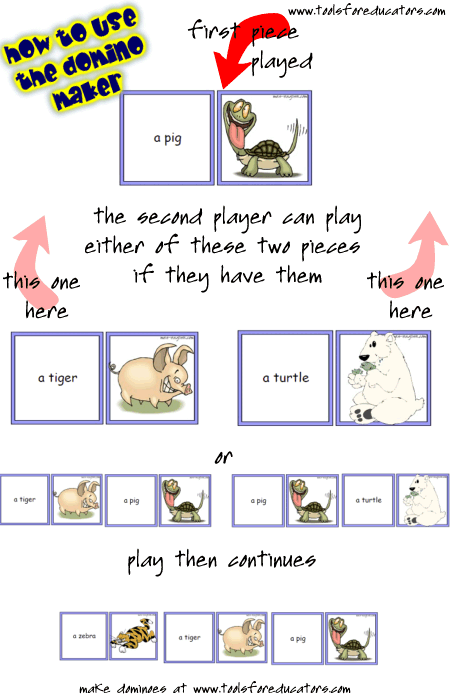
Domino Maker


Tools for Educators

 offers free domino maker, printable dominos with images and text; make your own dominoes 

as resources for lessons, lesson plans and K-6 printable materials for classes.   

The domino maker is a worksheet creator that allows you to create dominoes for any vocabulary set.  You can select the image you want to use and type in any text you'd like.  So, you can just enter a single word, enter a definition, or type in a two to three sentence description.  It's super simple, easy to use, but very powerful.   


Friday, July 6, 2012

LargeFilesASAP: Send Large files

LFASAP makes it is to send large files!
You dont need registration! Free Large Files (Up to 2Gb) tend to take a while. (Upload and download speed is dependent on your Internet Service Provider) * You can upgrade for $1 to add more recipients ** Sender gets copy of pickup email also. Files remain on server for 72 Hours Max inShare.

Thursday, June 21, 2012

Magisto


Magisto offers an automatic video editing solution that makes it easy for users to create and share professional looking movies, complete with effects and transitions, in a click. For years, video footage has lain dormant on memory cards and hard drives, collecting digital dust, because the prospect of video editing was too daunting a task. Magisto is designed to take the work out of video editing, helping users create movies they'll be proud to share, automatically, while they sit back and relax.


How does it work? Users upload their raw video footage via Magisto's web app or iPhone app and Magisto automatically analyzes it. State of the art computer vision technology detects and indexes people, scenes and behaviors, understanding the difference between people, pets, landscapes, toys and more. This artificial intelligence is used to edit together a video of all the most interesting parts of the footage, complete with effects, transitions and music. Magisto also stabilizes the video footage and removed excess "noise" to make user footage look as good as possible. Once videos have been produced they can be shared in one click via Facebook, Twitter, YouTube or email.

Monday, June 18, 2012

Todays Meet

TodaysMeet Talk. Listen. TodaysMeet helps you embrace the backchannel and connect with your audience in realtime. Encourage the room to use the live stream to make comments, ask questions, and use that feedback to tailor your presentation, sharpen your points, and address audience needs. Video Tutorial

Monday, June 11, 2012

Oolone: visual search engine

Oolone is a search engine like Google, but it uses visual technology to help you find results. Instead of text results, we bring up pictures of results.

Glogster : create your poster

Glogster is a unique social network based on the creation and sharing of Glogs - interactive posters loaded with text, graphics, music, videos, and more. Glogster’s goal was to provide an outlet for unlimited creative expression online. Example by Laura Vázquez:


 Eduglogster Glogster EDU Premium is a collaborative online learning platform for teachers and students to express their creativity, knowledge, ideas and skills in the classroom.

Dipity: Interactive multimedia Timeline

Dipity is a free digital timeline website. Our mission is to organize the web's content by date and time. Users can create, share, embed and collaborate on interactive, visually engaging timelines that integrate video, audio, images, text, links, social media, location and timestamps. Tutorial:

Monday, June 4, 2012

Pixton: Comics for fun


 Pixton introduces the world to Click-n-Drag Comics™, a revolutionary new patent-pending technology that gives anyone the power to create amazing comics on the web. From fully posable characters to dynamic panels, props, and speech bubbles, every aspect of a comic can be controlled in an intuitive click-n-drag motion.  


How to use it:


 Example: